Cartoonize
Transform your photos into cartoon or comic-style illustrations using AI. Multiple cartoon styles available from anime to Disney-style.
About this tool
Your photo, redrawn as a cartoon
Cartoonize turns a photo into a cartoon, anime or comic illustration while keeping the person recognisable. Choose a style, upload a picture, and the image model redraws it with the outlines, color and proportions of that style. It works best on clear portraits and group shots and is designed for profile pictures and shareable posts.
Six styles are offered: Cartoon for bold outlines and flat color, Anime for big eyes and clean linework, Caricature for exaggerated features, Disney for expressive classic animation, Simpsons for the yellow-skinned look, and Pixar 3D for rounded, rendered characters. The result is a full-size PNG shown beside the original in a slider, ready to download or save.
Example
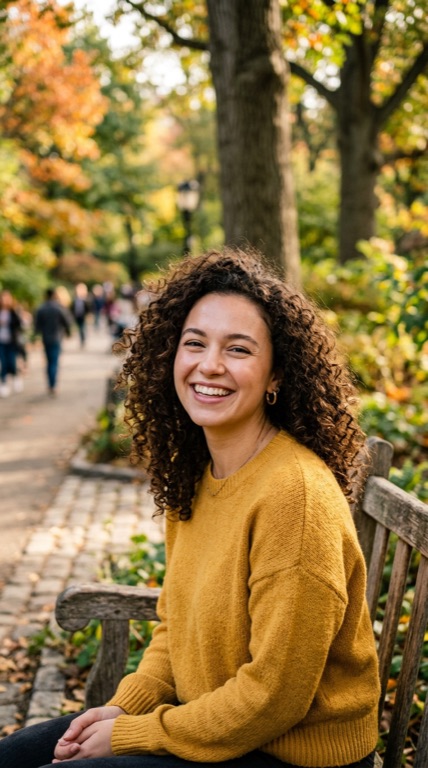
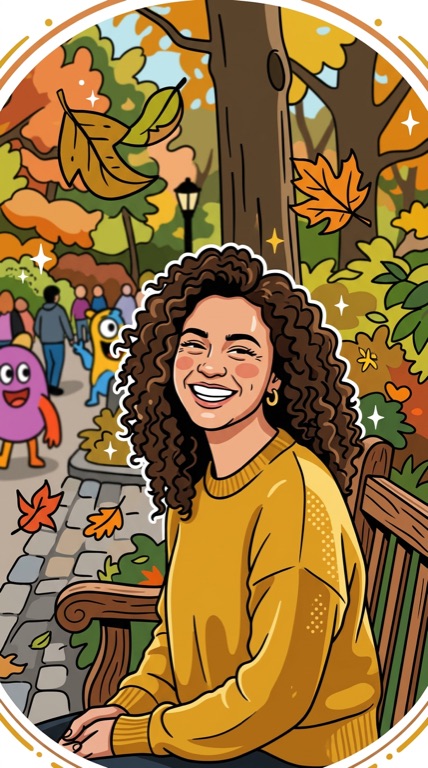
Cartoon. The before photo is AI-generated, standing in for an upload. The result is unedited tool output, November 2026.
Use it for
- Profile pictures: Use an anime effect or Pixar 3D avatar on social and gaming accounts.
- Birthday and gift art: Make a caricature of a friend for a card or a printed mug.
- Family fun: Cartoonize a group photo and see everyone in Simpsons style.
How it works
- Upload a PNG, JPG or WebP up to 25MB.
- Pick Cartoon, Anime, Caricature, Disney, Simpsons or Pixar 3D.
- Click Cartoonize and compare with the original.
- Download the PNG or save it to your gallery.
2 credits per run. Credits never expire.
Questions
What does Cartoonize cost?
Two credits per image. Each style is a separate run. Credits are deducted after success and never expire.
Will I still look like me?
The model is instructed to keep a recognisable likeness. Caricature deliberately exaggerates, so expect bigger changes there.
Does it work on pets and objects?
Yes, although the styles are tuned for people. Pets usually cartoonize well.
What files are supported?
PNG, JPG and WebP up to 25MB. The output is a PNG.