Relight
Relight your photos with AI: add studio lighting, golden hour warmth, dramatic shadows, or soft natural light. Transform any photo mood.
About this tool
Change the light after the shot
Relight changes the lighting and mood of a photo after it was taken. Instead of adjusting exposure globally, the AI reworks light direction, shadows, highlights and color temperature so the scene looks as if it had been photographed under different conditions. The subject and composition stay where they are; only the light changes.
Eight lighting modes are available: Golden Hour, Blue Hour, Studio Light, Dramatic, Natural, Moody, Neon Glow and Soft Light. Golden Hour adds warm low sun and long shadows, Studio Light gives balanced neutral light with soft shadows, Dramatic creates high-contrast spotlighting, and Neon Glow adds colorful urban night light. You get a full image back in a slider.
Example

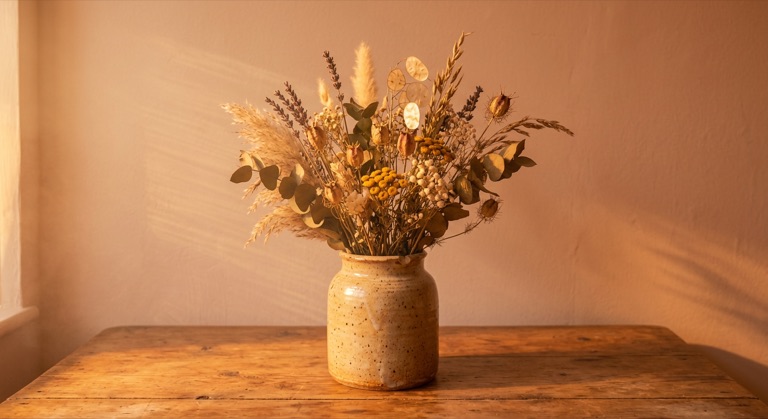
Golden hour. The before photo is AI-generated, standing in for an upload. The result is unedited tool output, November 2026.
Use it for
- Flat portraits: Add soft or studio light to a selfie taken under harsh overhead lighting.
- Product mood: Show the same item under dramatic, natural and golden hour light for different campaigns.
- Set a scene: Turn a midday street photo into a blue hour or neon-lit night shot.
How it works
- Upload a PNG, JPG or WebP up to 25MB.
- Choose one of the eight lighting modes.
- Click Relight and compare the result with the original.
- Download the PNG or save it to your gallery.
2 credits per run. Credits never expire.
Questions
How much does Relight cost?
Two credits per image, deducted after a successful run. Credits never expire.
Does it move or change the subject?
The model is told to preserve the subject and composition and only change lighting, shadows and color temperature.
Which mode is best for headshots?
Studio Light or Soft Light for a clean look. Use Dramatic for editorial portraits.
What files can I use?
PNG, JPG and WebP up to 25MB. The result downloads as a PNG.