Retro Effects
Apply authentic retro effects from different eras: 70s vintage warmth, 80s neon, 90s disposable camera, VHS tape, and classic 35mm film looks.
About this tool
Film and VHS looks from every decade
Retro Effects applies an era-specific vintage look to any photo. Rather than a single sepia slider, you choose a decade or medium and the image model rebuilds the color, grain and artefacts of that period. Six styles are available: 70s Vintage, 80s Neon, 90s Disposable, VHS Tape, 35mm Film and Sepia Antique.
Each style has its own recipe. 70s Vintage adds a golden cast, lifted blacks and earthy tones. 80s Neon brings saturated pink and cyan with a CRT glow. 90s Disposable has a cross-processed, teal and orange snapshot feel. VHS Tape adds scan lines, color bleed and tracking distortion. 35mm Film gives natural grain and highlight roll-off. Sepia Antique produces an aged, brown-toned print.
Example
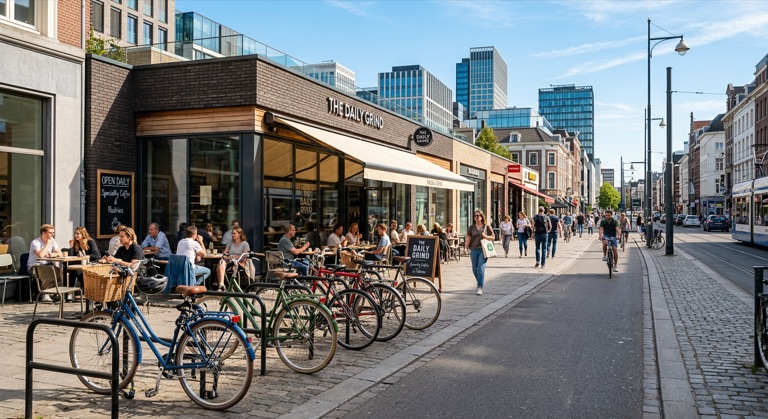
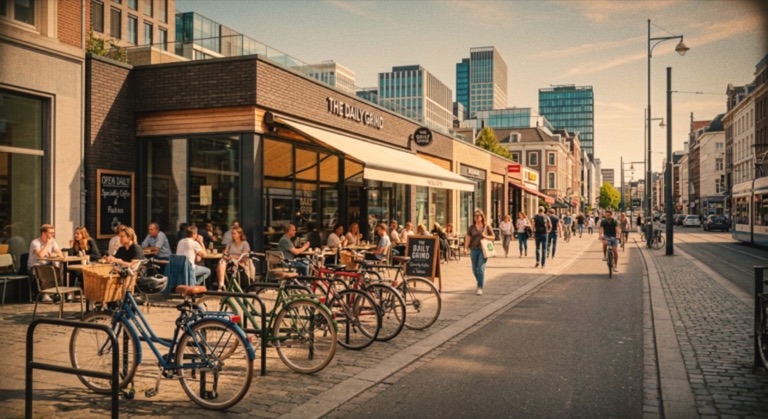
1970s. The before photo is AI-generated, standing in for an upload. The result is unedited tool output, November 2026.
Use it for
- Throwback content: Match a modern photo to an 80s filter or 90s disposable camera aesthetic.
- Music and event art: Use the VHS effect or neon look for gig posters and cover images.
- Film grain without film: Give digital shots the texture of 35mm stock for a consistent portfolio.
How it works
- Upload a PNG, JPG or WebP up to 25MB.
- Pick one of the six retro styles.
- Click Apply and compare the result with the original.
- Download the PNG or save it to your gallery.
1 credit per run. Credits never expire.
Questions
How much does a retro effect cost?
One credit per image, deducted after a successful run. Credits never expire.
Can I stack two styles?
Run the tool, download the result, then upload it again with a second style. Each pass costs one credit.
Does it change the composition?
No. The framing stays the same; only color, contrast, grain and era-specific artefacts are added.
What file formats are supported?
PNG, JPG and WebP up to 25MB. The output is a PNG.