AI Expand
Expand your images beyond their borders using AI outpainting. Extend backgrounds, add more scene, or create wider compositions seamlessly.
About this tool
Uncrop your photo in any direction
AI Expand is an outpainting tool. It extends a photo past its original borders by generating new content that continues the scene: more sky, more floor, the rest of a wall or a wider landscape. It is the fix for a tightly cropped shot, a portrait that needs to become a landscape, or a subject that sits too close to the edge.
You choose where to grow: All Directions, Horizontal, Vertical, Left, Right, Top or Bottom. An optional context note of up to 500 characters tells the image model what should appear in the new area, for example 'sandy beach and more ocean'. Without a note it infers the continuation from the image. The expanded image is returned as a PNG.
Example
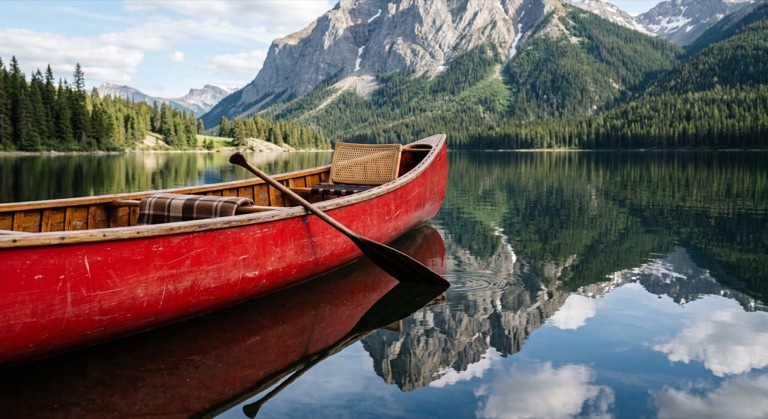
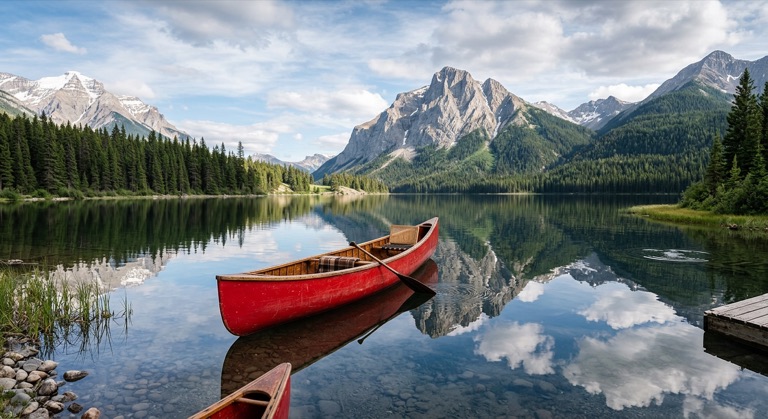
Expand all sides. The before photo is AI-generated, standing in for an upload. The result is unedited tool output, November 2026.
Use it for
- Fix tight crops: Add breathing room around a subject that was framed too closely.
- Change orientation: Expand a vertical phone photo horizontally for a widescreen banner.
- Build a backdrop: Extend a studio or product shot so there is space for text.
How it works
- Upload a PNG, JPG or WebP up to 25MB.
- Select an expansion direction.
- Optionally describe what the new area should contain, then click Expand or press Ctrl+Enter.
- Download the expanded PNG or save it to your gallery.
3 credits per run. Credits never expire.
Questions
What does AI Expand cost?
Three credits per run, deducted after a successful expansion. Credits never expire.
How is this different from Aspect Ratio?
Aspect Ratio targets a fixed format like 16:9. AI Expand grows the image in the direction you pick and accepts a context hint.
Can I expand the same image twice?
Yes. Download the result and upload it again to grow further. Each pass is a new run.
What files are accepted?
PNG, JPG and WebP up to 25MB.