AI Expand · 3 credits
Extend the background of a photo
Uncrop a tight photo: extend the background left, right, up or down with AI outpainting, with an optional hint for what to add. 3 credits.
A subject jammed against the edge of the frame, a portrait that needs to be a banner, a landscape cropped too tight: AI Expand grows the photo past its original borders by generating new content that continues the scene.
Choose a direction (all around, horizontal, vertical, or a single side) and optionally describe what should appear, like "more sandy beach and ocean". Without a hint, the AI infers what comes next from the image.
Example
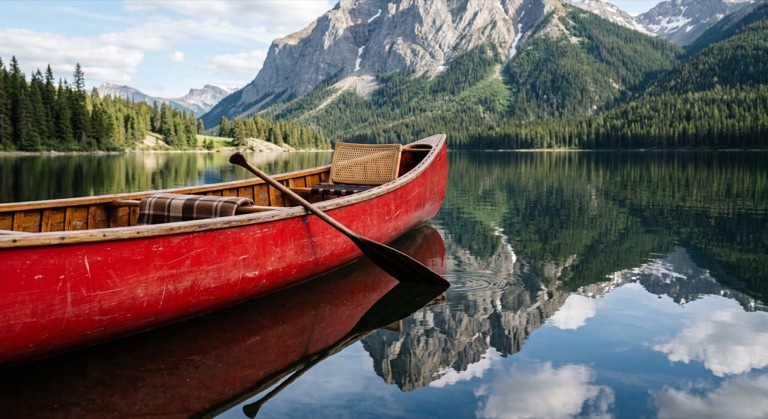
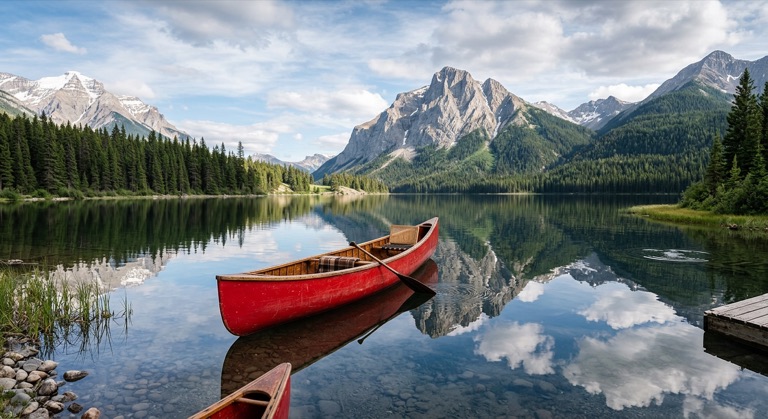
Expand all sides. The before photo is AI-generated, standing in for an upload. The result is unedited tool output, November 2026.
How to do it
- Upload the photo to AI Expand (up to 25MB).
- Pick the direction to grow.
- Optionally add a short note about what belongs in the new area.
- Download the PNG, or upload it again to expand further.
Tips
- Expand in steps for large changes; each pass is more convincing than one huge jump.
- Use a hint when the edge of the frame cuts through something the AI might misread.
- For a fixed format like 16:9, the Aspect Ratio tool is quicker.
3 credits per run. New accounts get 10 free credits; after that, credit packs start at $5 and never expire.
Questions
How is this different from Aspect Ratio?
Aspect Ratio targets a fixed format. AI Expand grows in the direction you pick and accepts a context hint.
Can I expand more than once?
Yes. Download the result and run it again; each pass is a new run.
What does it cost?
Three credits per run.