Aspect Ratio
Change image aspect ratio using AI. Extend backgrounds seamlessly for any platform: Instagram, YouTube, TikTok, or custom dimensions.
About this tool
Resize for any platform without cropping
The aspect ratio changer reshapes a photo to a new format by extending the scene instead of cutting into it. Pick a target ratio and the AI generates new background on the sides or top and bottom so the whole original stays visible. It is the easy way to resize an image for social media without losing a person's feet or the edge of a product.
Seven presets are available: Square 1:1, Widescreen 16:9, Vertical 9:16, Classic 4:3, Portrait 3:4, Cinematic 21:9 and Instagram 4:5. The image model matches lighting, color and texture across the new areas and keeps the main subject in focus. You get a single image at the chosen ratio, shown beside the original in a slider.
Example
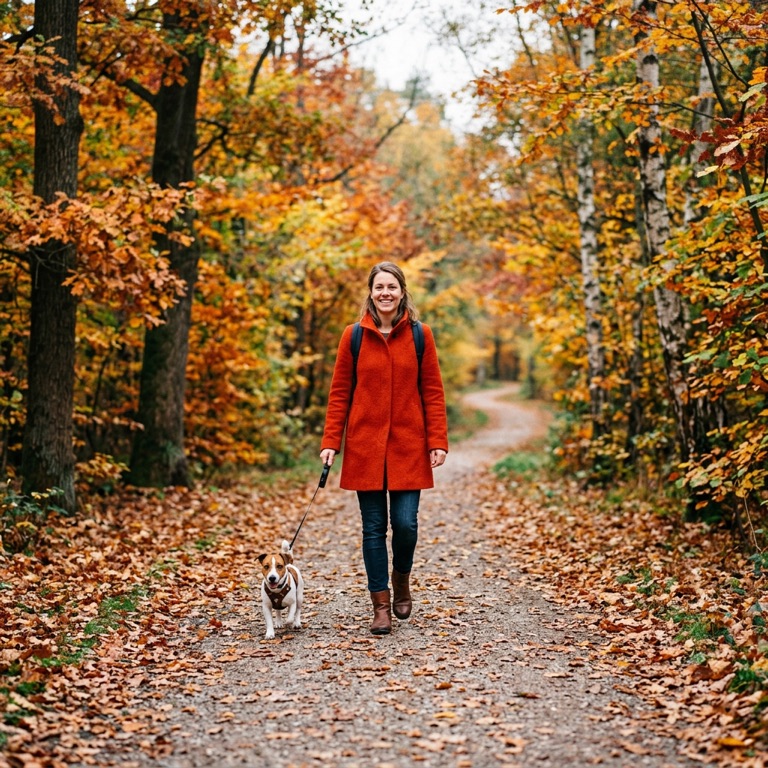
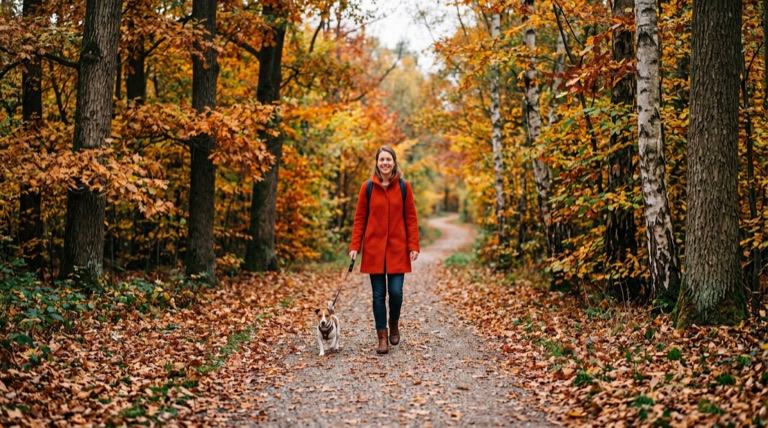
Widescreen 16:9. The before photo is AI-generated, standing in for an upload. The result is unedited tool output, November 2026.
Use it for
- One photo, many feeds: Make 9:16 Stories, 4:5 Instagram posts and 16:9 YouTube thumbnails from the same shot.
- Landscape to portrait: Turn a horizontal scene into a vertical wallpaper or print by extending sky and ground.
- Cinematic banners: Stretch a photo to 21:9 for website heroes and presentation covers.
How it works
- Upload a PNG, JPG or WebP up to 25MB.
- Select one of the seven aspect ratios.
- Click the process button or press Ctrl+Enter.
- Compare, then download the PNG or save it to your gallery.
2 credits per run. Credits never expire.
Questions
How many credits does a resize use?
Two credits per image, deducted after a successful run. Credits never expire.
Does it crop my image?
No. The tool extends the picture with AI-generated content to reach the new ratio. The original pixels are kept.
Can I enter custom dimensions?
Not yet. The seven ratio presets cover the common social, video and print formats. Use AI Expand for directional growth.
What files are accepted?
PNG, JPG and WebP up to 25MB. The result downloads as a PNG.