Avatar Generator · 3 credits
Turn your photo into an anime avatar
Turn a photo of your face into an anime, Pixar-style, cyberpunk or comic avatar for Discord, gaming and social profiles. 3 credits per avatar.
A stylized avatar works where a real photo feels too personal or too plain: Discord, gaming handles, forums and social profiles. The Avatar Generator redraws your face as a head-and-shoulders portrait in the style you pick, keeping your recognizable features.
Anime gives smooth linework and big eyes. The other styles are Pixar, Cyberpunk, Renaissance, Comic Book, Watercolor, Pop Art and Fantasy. Each run makes one avatar, so try a few and keep your favorite.
Example
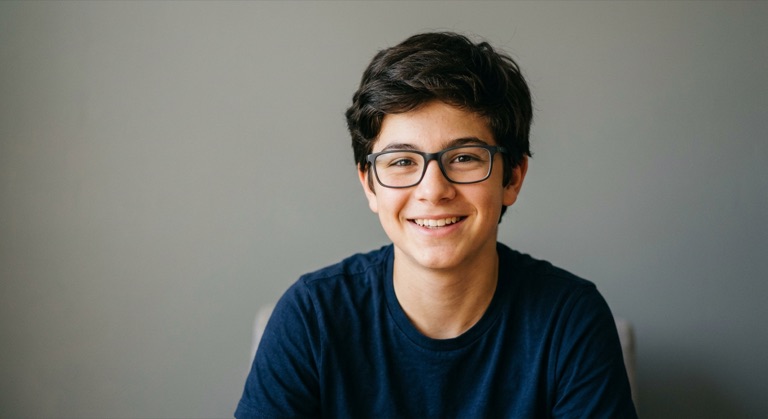
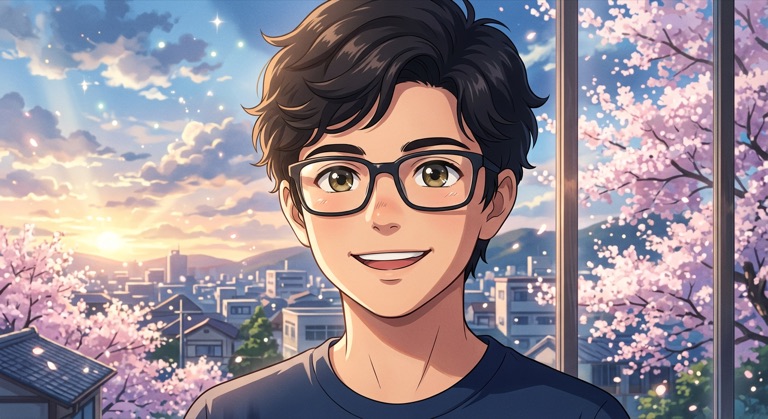
Anime. The before photo is AI-generated, standing in for an upload. The result is unedited tool output, November 2026.
How to do it
- Upload a front-facing photo with good light and nothing covering your face.
- Choose Anime, or any of the other seven styles.
- Run it and compare the avatar with your photo.
- Download it and set it as your profile picture.
Tips
- A plain background gives the style more room.
- Crop to a square or circle preview before uploading it to a platform.
- Use the same style across platforms so people recognize you.
3 credits per run. New accounts get 10 free credits; after that, credit packs start at $5 and never expire.
Questions
Which styles are there?
Anime, Pixar, Cyberpunk, Renaissance, Comic Book, Watercolor, Pop Art and Fantasy.
Do I get several avatars per run?
One per run. Run more styles to build a set.
What does it cost?
Three credits per avatar. New accounts get 10 free credits.