Colorize · 2 credits
Bring old family photos into color
Add natural color to black-and-white family photos: grandparents' portraits, weddings, old street scenes. Four color styles. 2 credits per photo.
Seeing a grandparent's wedding portrait or a great-grandfather's army photo in color makes them feel present in a way black and white rarely does. The colorizer reads the scene (skin, hair, fabric, foliage, sky) and paints in plausible color without any masking or color picking.
Natural gives realistic, everyday color. Vintage uses the warm, slightly faded palette of 1950s–1970s color prints, which often suits family albums best. Vibrant and Cinematic are there for a more modern or graded look.
Example
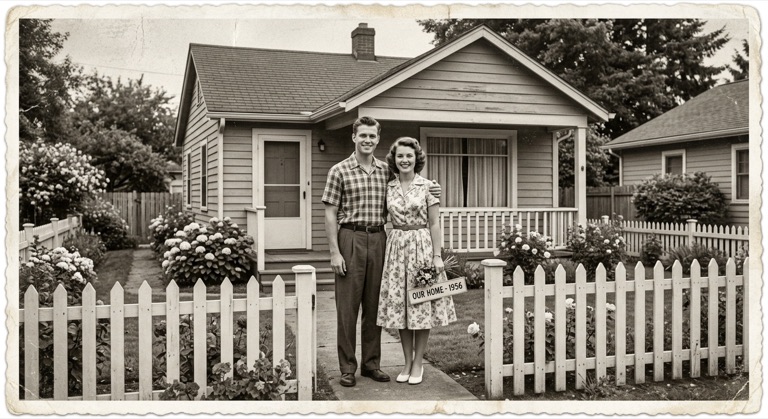
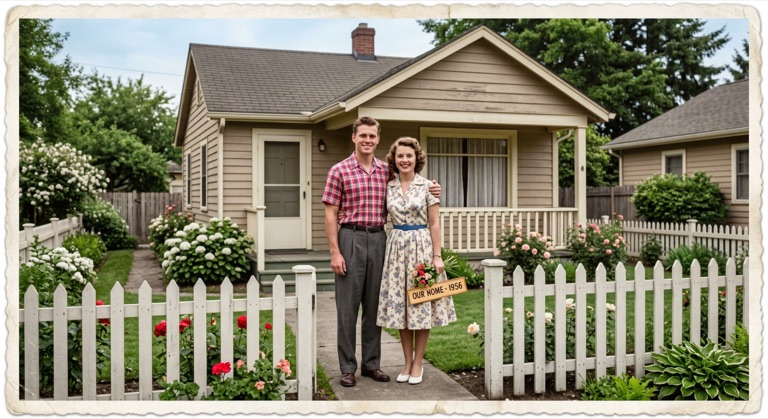
Natural. The before photo is AI-generated, standing in for an upload. The result is unedited tool output, November 2026.
How to do it
- Scan the photo; if it's scratched or faded, run Old Photo Restore first.
- Upload it to Colorize and pick a style: Natural or Vintage for family photos.
- Compare the result with the original in the slider.
- Download the PNG to print, frame or share with family.
Tips
- Restore first, then colorize: clean input gives better color.
- If you know a detail (a uniform color, a family car), note that the AI can't; it guesses from context.
- Print both versions side by side as a gift.
2 credits per run. New accounts get 10 free credits; after that, credit packs start at $5 and never expire.
Questions
Are the colors historically accurate?
They're inferred from context. Skin, sky and vegetation are usually convincing, but the AI can't know the true color of a specific dress or car.
What does it cost?
Two credits per photo. New accounts get 10 free credits, enough for five photos.
Can I colorize a sepia photo?
Yes. Black-and-white and sepia photos both work.