Product Studio · 3 credits
White-background product photos from a phone shot
Turn a phone photo of a product into a clean white-background shot with studio lighting and soft shadows, for Amazon, eBay, Etsy and Shopify.
Most marketplaces want a main image on a pure white background, and a good one takes a lightbox, lights and editing time. Product Studio does it from a phone photo: it removes the original background, places the product on a white studio backdrop, and adds lighting with soft shadows while keeping the product's colors and details accurate.
The White Studio preset is built for main listing images. For secondary images, switch to a scene such as On Marble, In Kitchen or On Wood, or describe your own in up to 300 characters.
Example
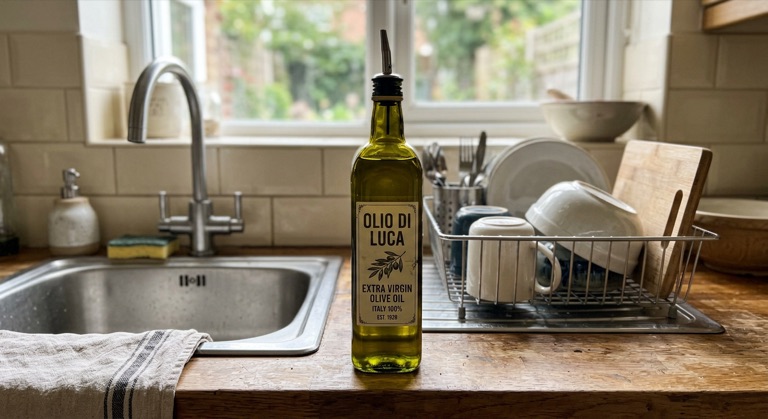
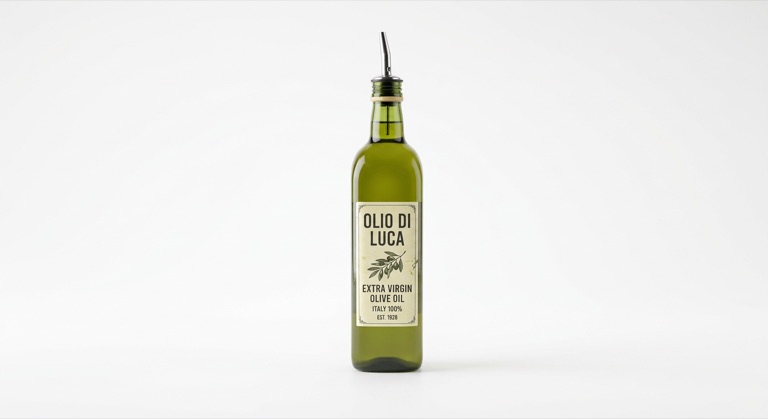
White studio. The before photo is AI-generated, standing in for an upload. The result is unedited tool output, November 2026.
How to do it
- Photograph the product in good light, filling most of the frame.
- Upload it to Product Studio and choose White Studio.
- Check that colors and labels match the real product.
- Download it and upload it as your main listing image.
Tips
- Each marketplace has its own image rules; check the size and how much of the frame the product must fill.
- Shoot every product from the same angle for a consistent catalog.
- Use the lifestyle presets for the secondary images that show scale and use.
3 credits per run. New accounts get 10 free credits; after that, credit packs start at $5 and never expire.
Questions
Do I need to remove the background first?
No. Product Studio removes it as part of the run.
Will the product look different?
The model is told to keep colors and details accurate. Always compare against the real item so the listing stays honest.
What does it cost?
Three credits per image. New accounts get 10 free credits.