Headshot Generator
Generate professional AI headshots for LinkedIn, resumes, and business profiles. Multiple styles: corporate, creative, casual professional.
About this tool
A professional headshot from a selfie
The AI headshot generator turns an ordinary selfie into a professional portrait for LinkedIn, a resume, a company page or a speaker bio. The image model keeps your face and likeness, then applies studio lighting, a clean background, polished but natural skin and proper head-and-shoulders framing. No photographer, no studio booking.
Five styles match different needs. LinkedIn Professional uses a neutral corporate backdrop. Corporate is formal with a dark gray or navy background. Creative Professional adds a softer, more approachable setting. Actor Headshot uses a white or light gray background with dramatic light. Casual Professional has a blurred outdoor or lifestyle background. The result appears next to your original.
Example
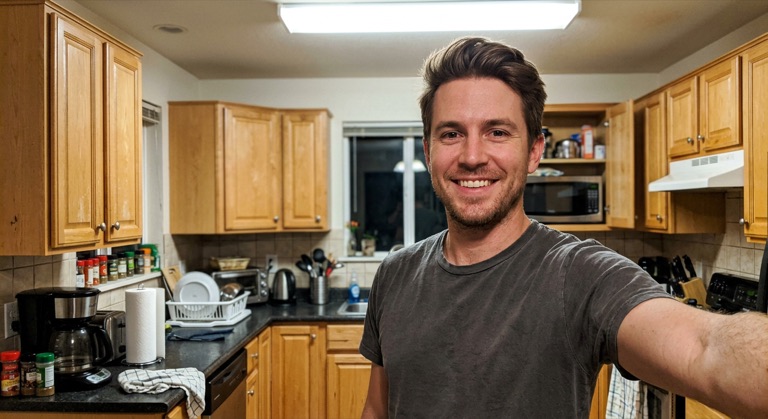

LinkedIn. The before photo is AI-generated, standing in for an upload. The result is unedited tool output, November 2026.
Use it for
- LinkedIn and job applications: Replace a cropped holiday photo with a business headshot that looks intentional.
- Team pages: Give everyone on a small team a consistent style without a group photo day.
- Speaker and press kits: Produce a clean AI portrait for conference and podcast listings.
How it works
- Upload a clear face photo or selfie (PNG, JPG or WebP up to 25MB).
- Choose LinkedIn, Corporate, Creative, Actor or Casual.
- Click Generate Headshot or press Ctrl+Enter.
- Compare, then download the PNG or save it to your gallery.
3 credits per run. Credits never expire.
Questions
What does a headshot cost?
Three credits per generation. Credits are deducted after a successful run and never expire.
What kind of photo should I upload?
Face the camera in good light, without hats or sunglasses. A phone selfie at arm's length is fine.
Will it still look like me?
The model is instructed to maintain your likeness and character while improving lighting, background and framing.
Can I change the outfit?
The styles imply suitable attire, but there is no outfit picker. For specific changes, use AI Replace on the result.