Headshots · 3 credits
A professional resume photo, no studio needed
Make a professional photo for your resume or CV from a selfie: clean background, studio lighting, natural look. 3 credits, no photographer.
In many countries a CV is expected to include a photo, and it should look professional: neutral background, good light, head and shoulders. The Headshots tool turns a selfie into exactly that, keeping your face while fixing the lighting, background and framing.
Corporate gives the most formal result, LinkedIn Professional a slightly lighter corporate look, and Casual Professional a softer outdoor background for creative roles. One selfie can produce several options.
Example
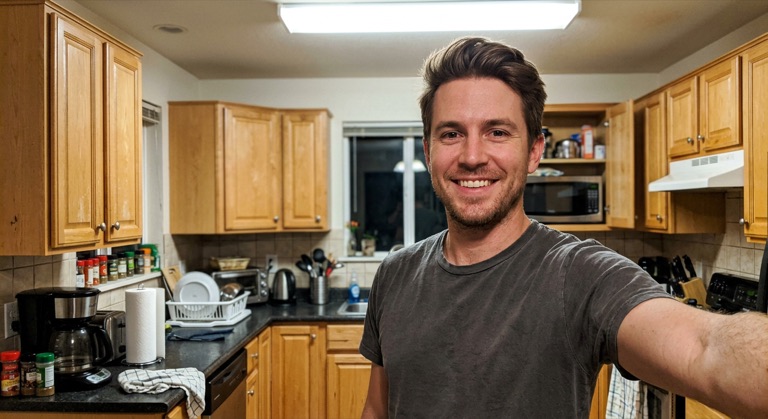
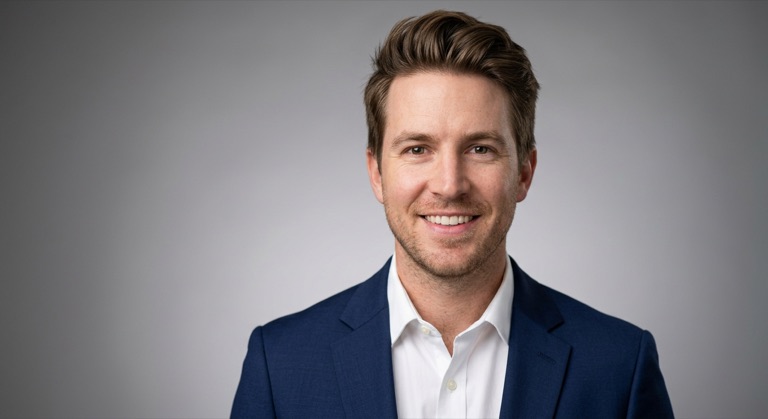
LinkedIn. The before photo is AI-generated, standing in for an upload. The result is unedited tool output, November 2026.
How to do it
- Take a front-facing selfie in good light, with nothing covering your face.
- Upload it to Headshots and choose Corporate or LinkedIn Professional.
- Download the result and crop it to the size your CV template uses.
Tips
- Check the norms for the country you're applying in; in the US and UK photos are often left off.
- A neutral expression with a slight smile reads best at small sizes.
- Use the same photo on your CV and LinkedIn so recruiters recognize you.
3 credits per run. New accounts get 10 free credits; after that, credit packs start at $5 and never expire.
Questions
Which style is best for a CV?
Corporate for formal industries, LinkedIn Professional for most others, Creative Professional or Casual Professional for creative roles.
Is it accurate enough to use officially?
It keeps your likeness, but it's an AI-edited portrait. Don't use it for passports or ID documents, which need unedited photos.
What does it cost?
Three credits per headshot.