Remove Background
Remove backgrounds from images instantly with AI. Upload a photo, get a clean cutout, and download a transparent PNG in seconds.
About this tool
Clean cutouts without the pen tool
The AI background remover takes a photo and returns the subject on a transparent background. You upload a JPG, PNG or WebP, press one button, and get a PNG cutout with the alpha channel already in place. There is no manual masking, no magic wand clean-up and no software to install. It runs in the browser on any device.
Before processing, the image is resized to a maximum of 1024 pixels on its longest side and sent to an image model that is instructed to keep hair, fur and fine edges intact while making the background fully transparent. The result appears next to the original in a before-and-after slider, ready to download or save to your gallery.
Example
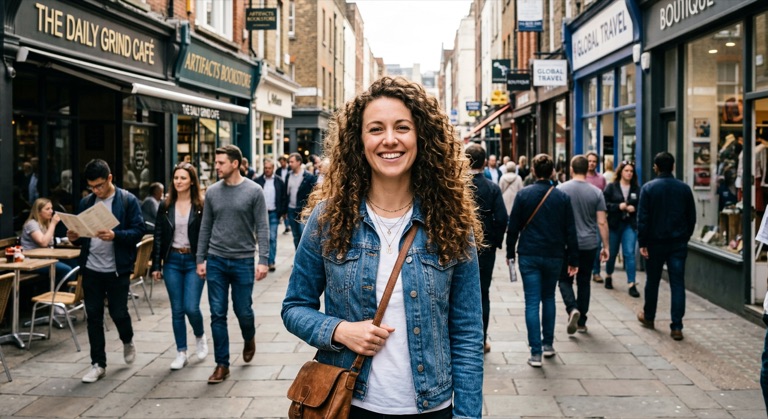

The before photo is AI-generated, standing in for an upload. The result is unedited tool output, November 2026.
Use it for
- Product listings: Isolate items for marketplace photos that need a plain or transparent background.
- Profile pictures: Cut yourself out of a busy snapshot before dropping in a new backdrop.
- Design assets: Turn a photo into a transparent PNG you can layer in Studio, slides or a flyer.
How it works
- Upload a JPG, PNG or WebP up to 10MB, or drag it onto the page.
- Click Remove Background and wait a few seconds while the AI processes it.
- Check the result with the comparison slider.
- Download the transparent PNG or save it to your gallery.
1 credit per run. Credits never expire.
Questions
How much does background removal cost?
One credit per image. Credits are only deducted after a successful run, and they never expire.
What file types and sizes are supported?
Any common image format, up to 10MB. The image is scaled to a maximum of 1024 pixels on the long side before processing, and the output is a PNG with transparency.
Does it keep hair and soft edges?
The model is told to preserve fine detail like hair and fur and to leave the subject's colors untouched. Very thin or motion-blurred edges can still need a second pass.
Is my photo stored?
The edge function returns the cutout and does not keep a copy. It is only added to your account if you choose Save to Gallery.
Guides
- Remove the background from product photos
- Make a logo transparent
- Turn a signature photo into a transparent PNG
- Cut a person out of a photo
- A remove.bg alternative with credits that never expire